> For the complete documentation index, see [llms.txt](https://smartpossdk.gitbook.io/cloudpossdk/llms.txt). Markdown versions of documentation pages are available by appending `.md` to page URLs; this page is available as [Markdown](https://smartpossdk.gitbook.io/cloudpossdk/cloudpos-sdk/mdb-communication-protocal.md).
# MDB Communication Protocal
### Introduction
This manual describes the serial communication protocol between Q3 Pos and MDB Interface Board, which will be short as “MIB” in follow content.
The basic baud rate of serial port is set as 115200
As the Q3 POS could be receive command from MIB as a slave, and also could send command to MIB as a master (e.g., send “begin session” command to inform the MDB VMC it’s ready for pay), a mode byte was added in serial frame to show if a command is slave response or a master request.
The request command always anticipates a response command except the checksum is wrong, or the incorrect serial format, in another word, the slave will use silence as a NAK. **Please refer to the** [**documentation** ](https://ftp.wizarpos.com/advanceSDK/MDB_interface_board_serial_protocol_20241226.pdf)**for specific commands and details.**
### Serial Protocol Packet Definition
#### Serial Port Parameters
* Baud rate: 115200
* Data format: 8 bits, 1 stop bit, no parity
#### Packet Format
* Start code: size 1 byte, always be 0x09
* Length: size 1 byte, the number bytes of mode, data, and checksum.
* Mode: size 1 byte, 0x00 means a request packet, 0x01 means a response packet, other value is prohibited.
* Data: size n bytes, The data could be raw MDB commands, such as SETUP, VEND. Or the MIB control commands, such as GET VERSION, SET PARAMETER.
* Checksum: size 1 byte, using LRC algorithm, input data were "mode, data"
* End code: size 1 byte, always be 0x0D.
### Specifics
#### MDB Forwarding Mechanism
When the MIB receive the VMC request, it removes the MDB mode bit, fill into serial packet data area, and transmit to serial port. In the opposite direction, the MIB receive the response, it unwraps the packet, and adding mode bit to the tail bytes, sending to the VMC, wait for the acknowledge.MIB will forward all the MDB cashless device commands (MDB spec section 7), except VMC request Poll.
Example: RESET
1. *VMC -> MIB:* 0x110 0x10
2. *MIB -> Q3V:* 0x09 0x04 0x00 0x10 0x10 0xE0 0x0D
3. Q3V *-> MIB:* 0x09 0x04 0x01 0x00 0x00 0xFF 0x0D
4. *MIB -> VMC:* 0x00 0x100
5. *VMC -> MIB : 0x00*
#### Application Notes
* Focus on steps 2 and 3 in the MDB Forwarding Mechanism.
* The application handles all cashless commands except POLL.
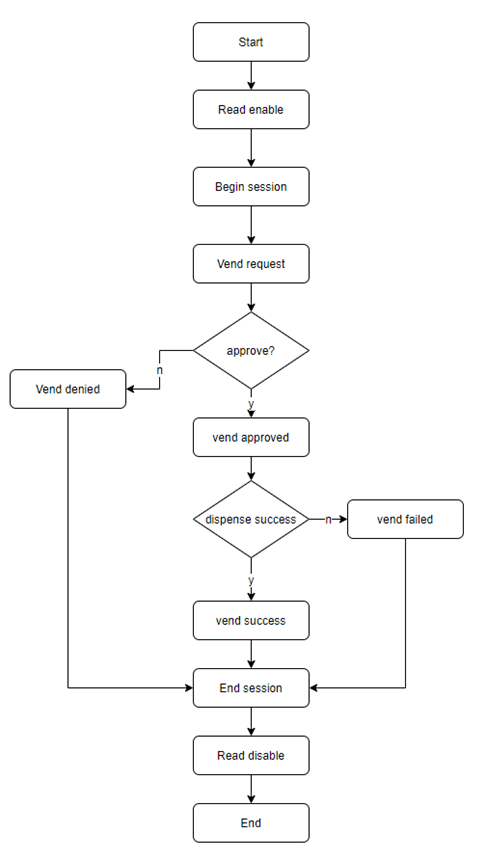
* The cashless reader initiates a begin session command to notify the VMC when ready for a transaction.
* MDB raw data includes its checksum byte, distinct from the serial frame checksum.
### A Typical MDB Transaction Flow
### Protocol Command Definition
{% hint style="info" %}
Please refer to the [documentation ](https://ftp.wizarpos.com/advanceSDK/MDB_interface_board_serial_protocol_20241226.pdf)for specific commands and details.
{% endhint %}
#### Common MDB Forwarding Command
This command forwards raw MDB commands (including MDB CHK), with the MDB mode bit removed.
Request Packet:
| Mode | Data |
| ----------- | -------------------------------------------------------------------- |
| Request 00H |
VMC Request Command
(Reset,Setup,Reader,Expansion,Vend)
|
Response Packet:
| Mode | Data |
| ------------ | ------------------- |
| Response 01H | Peripheral Response |
Example:\
MIB -> Q3V 09 04 00 10 10 E0 0D
Q3V -> MIB 09 04 01 00 00 FF 0D.
#### Begin Session Command
When the application is ready for a transaction, it issues a begin session command to inform the VMC master. This marks the beginning of a transaction. Balance amount is 2 bytes; if balance does not exist, fill with 0xFF. This command follows MDB spec definition but is initiated by the app.
Request Packet:
| Mode | Data |
| ----------- | ---------------------------------------------------- |
| Request 00H | Begin Session (03H) + Funds Available + MDB Checksum |
Response Packet:
| Mode | Data |
| ------------ | ------- |
| Response 01H | ACK 00H |
Example:\
Q3V -> MIB 09 06 00 03 00 64 67 32 0d
MIB -> Q3V 09 03 01 00 ff 0d
#### Session Cancel Request(0x04)
The application can end a payment session by issuing a session cancel request command. The POS acts as the master during this command.
Request Packet:
Mode
Data
Request 00H
Cancel Session Req(04H) + Funds Available + Checksum
Response Packet:
Mode
Data
Response 01H
ACK 00H
### Demo
[Source Code for Terminal App](https://github.com/SmartPOSSamples/MDBTest.git)
[APK](https://ftp.wizarpos.com/advanceSDK/MDBTransaction-3.2.9-release.apk)
### Testing
#### Test between terminal and VMC
* Please get above Demo APK, install it to terminal.
*Click the three horizontal lines icon button in the upper left corner to enter the setting interface. Set the balance(only for level 2), factor, decimal, level(2 or 3), and always aidl(only for level 3).*
\
*Click the MDB Start button to start the communication test.*
* Connect the terminal to VMC through by the MDB port of the terminal.
* Start the testing.
* [Testing Video: Connecting to a PC and Running the MDB Test](https://ftp.wizarpos.com/techsupport/ticket/mdbtestconnectpc.mp4).
* [Testing Video: Connecting to a Coffee Machine](https://ftp.wizarpos.com/techsupport/ticket/connectcoffemachine.mp4).
* [Testing Video: Connecting to an MDB Board](https://ftp.wizarpos.com/VideoIntroduce/mdbconnecttoVMCtesting.mp4).
#### Test between PC simulator and terminal
There're two types of MDB RS232 box, please confirm which one are you testing:
[Testing Guide for blue MDB232 box](https://ftp.wizarpos.com/advanceSDK/mdb/blueboxtestMDB.zip)
* [MDB for coffee demo APK](https://ftp.wizarpos.com/advanceSDK/mdb/bluebox/MDBForCoffeeDemo-sign-wrf.apk)
* [MDB for coffee demo usage](https://ftp.wizarpos.com/advanceSDK/mdb/bluebox/MDBForCoffeeDemousage20220725.wps)
* [EXE application in PC](https://ftp.wizarpos.com/advanceSDK/mdb/bluebox/Q3V-test.exe)
[Testing Guide for black MDB-RS232 box](https://ftp.wizarpos.com/advanceSDK/mdb/blackboxtestMDB.zip)
* [APK for testing](https://ftp.wizarpos.com/advanceSDK/mdb/MDBTest-1.0.30-release-SHA256-v1v2-signed.apk)
* [Usage for testing](https://ftp.wizarpos.com/advanceSDK/mdb/blackbox/Emulatortestingmethod.docx)
* [Vedio for testing](https://ftp.wizarpos.com/advanceSDK/mdb/blackbox/df74750f2d06b25b470fa795e8a4fff8.mp4)
* [EXE application in PC](https://ftp.wizarpos.com/advanceSDK/mdb/blackbox/MDB_RS232_Software.exe)
* [MDB-RS232 Quick Start](https://ftp.wizarpos.com/advanceSDK/mdb/MDB_RS232_Quick_Start.pdf)