> For the complete documentation index, see [llms.txt](https://smartpossdk.gitbook.io/paywizard-open-api/llms.txt). Markdown versions of documentation pages are available by appending `.md` to page URLs; this page is available as [Markdown](https://smartpossdk.gitbook.io/paywizard-open-api/cloud-api/quick-start-cloud-api.md).
# Quick Start - Cloud API
WizarPOS Paywizard Open platform API Instructions
## Step 1. Register as a platform client
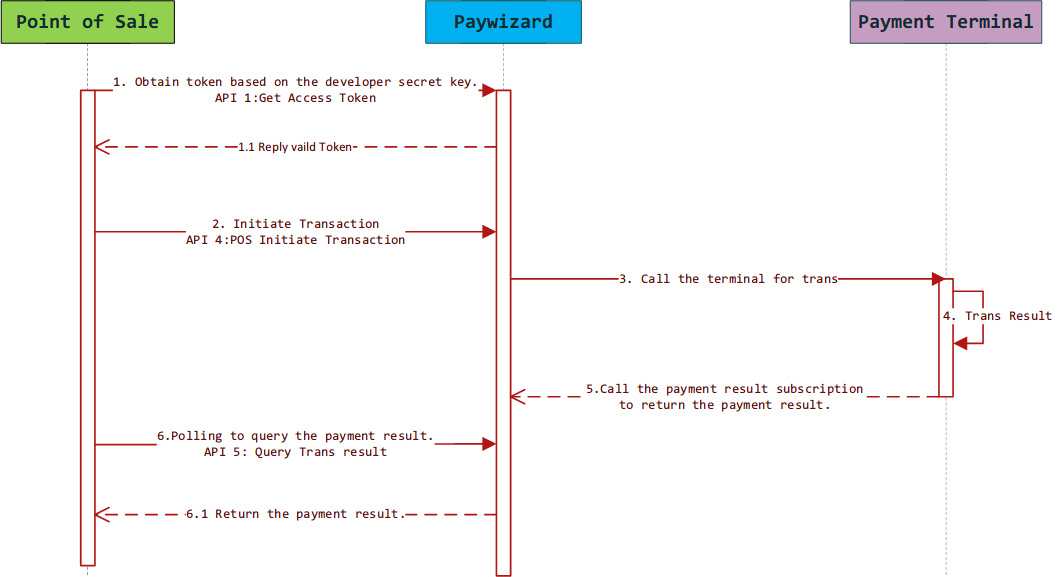
## Step 2. Get your Access Token
For merchants in the production environment, we will also provide a semi-permanent token to be used for transactions.
{% hint style="danger" %}
Please note that this API endpoint has been deprecated. Once you are onboarded as one of our developers, we will provide you with a semi-permanent token for testing. For merchants in the production environment, we will also provide a semi-permanent token to be used for transactions.
{% endhint %}
{% content-ref url="/pages/fSkbbMwhK36ynDF7Gnk0" %}
[Get Access Tokens](/paywizard-open-api/cloud-api/pos-and-payment-terminal-binding-process/get-access-tokens.md)
{% endcontent-ref %}
## Step 3. Begin API integration
{% hint style="info" %}
**A valid token is needed when calling the APIs**
{% endhint %}
## Step 4. Bind POS & Payment Terminal
{% content-ref url="/pages/msKWaaqSjzA2kKHmoSAi" %}
[API: Bind POS & Payment Terminal](/paywizard-open-api/cloud-api/pos-and-payment-terminal-binding-process/api-bind-pos-and-payment-terminal.md)
{% endcontent-ref %}
## Step 5. Do Transaction
{% content-ref url="/pages/KUnhrKOUndaLmyIrymEq" %}
[API: POS Initiate Transaction](/paywizard-open-api/cloud-api/do-transactions/api-pos-initiate-transaction.md)
{% endcontent-ref %}
## Step 6. Get Transaction Result
{% content-ref url="/pages/A2HXmhr4p9RkIsWWyzve" %}
[Get Transaction Result](/paywizard-open-api/cloud-api/get-transaction-result.md)
{% endcontent-ref %}